
# Cancellation workflow
Warning: Deprecated Page
The PrestaShop Billing component is deprecated since January 2026. No new modules can use this component. Existing modules that already use it remain unchanged.
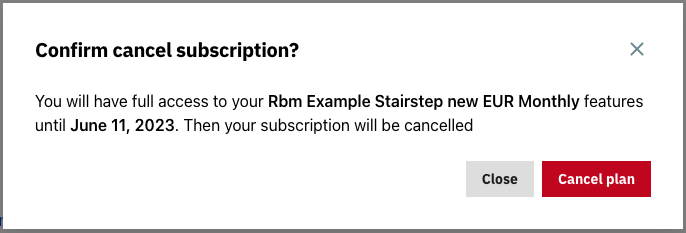
In some cases, you might want to understand the reason for a cancellation, or offer your customer a voucher to avoid it. We provide a mechanism which allows you to customize the cancellation workflow.
If you do so, you need to provide your own modal, as this one will not be displayed:
# Use the subscription management component
To customize the cancel modal and the cancellation workflow, use the subscription management component instead of the window.psBilling.initialize method.
Note
window.psBilling.initialize is only a wrapper to simplify the implementation of your module.
Here is a working example. Refer to the comments for more information.
<script src="{$urlAccountsCdn|escape:'htmlall':'UTF-8'}" rel=preload></script>
<script src="{$urlBilling|escape:'htmlall':'UTF-8'}" rel=preload></script>

<script>
    /*********************
    * PrestaShop Account *
    * *******************/
    window?.psaccountsVue?.init();

    // Check if Account is associated before displaying the Billing component
    if(window.psaccountsVue.isOnboardingCompleted() == true)
    {
        /*********************
        * PrestaShop Billing *
        * *******************/
        const onCloseModal = async (data) => {
          // When a modal is closed, we need to update the context
          await Promise.all([currentModal.close(), updateCustomerProps(data)]);
        };

        // Open the proper modal
        const onOpenModal = (type, data) => {
          currentModal = new window.psBilling.ModalContainerComponent({
            type,
            context: {
              ...context,
              ...data,
            },
            onCloseModal,
          });
          currentModal.render('#ps-modal');
        };

        const updateCustomerProps = (data) => {
          return customer.updateProps({
            context: {
              ...context,
              ...data,
            },
          });
        };

        let currentModal;

        // Here we instantiate the subscription management component
        const customer = new window.psBilling.CustomerComponent({
          context,
          hideInvoiceList: true,
          onOpenModal,
        });
        // Render the subscription management
        customer.render('#ps-billing');
    }
</script>
# Implement cancellation method
Once you have switched from window.psBilling.initialize method to the subscription management component, you should implement your own cancellation method. Here is a simple example that use the confirm() method of JavaScript. In your case you should use your own modal system.
  // Open the proper modal
  const onOpenModal = (type, data) => {
    currentModal = new window.psBilling.ModalContainerComponent({
      type,
      context: {
        ...context,
        ...data,
      },
      onCloseModal,
    });
    currentModal.render('#ps-modal');
  };

  const updateCustomerProps = (data) => {
    return customer.updateProps({
      context: {
        ...context,
        ...data,
      },
    });
  };

  // Here is the method called when your customer hits the "Cancel" button
  const onCancelSubscription = async ({ subscription }) => {
    // You should replace this section with your own code. Here, we just
    // created an example with a "Confirm" dialog
    const cancel = confirm('Cancel ?');

    // You can access the currentSubscription if you need to display information
    // about the subscription: price, next billing date, etc.
    if (cancel) {
      try {
        // Call customer.cancelSubscription() when you want to really cancel the subscription
        await customer.cancelSubscription();
        alert('Cancelled');
      } catch {
        alert('Error during cancellation')
      }
    } else {
      alert('No cancelled')
    }
  }

  let currentModal;

  // Here we instantiate the subscription management component
  const customer = new window.psBilling.CustomerComponent({
    context,
    hideInvoiceList: true,
    onOpenModal,
    // When an onCancelSubscription method is specified, it overrides the default cancellation workflow
    onCancelSubscription
  });

</script>